
Driver Power App
Byteblocks, LLCBusiness
2.910.00 Reviews
- Version
- 2.2.0
- Installs
- 10.00K
- Age Rating
- Everyone
Screenshots
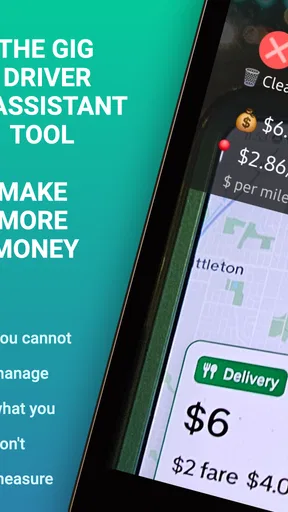
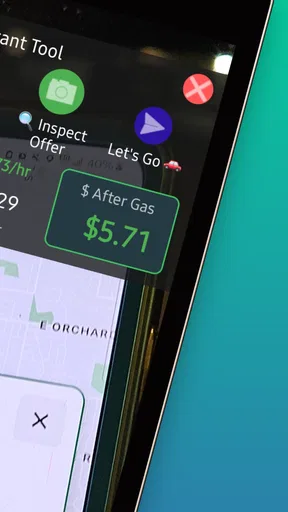
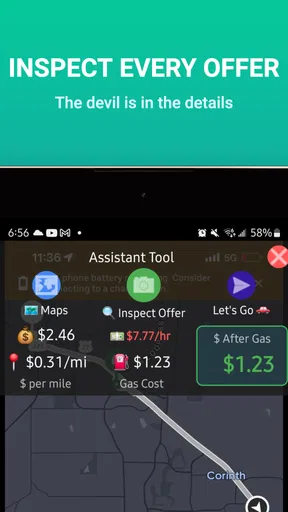
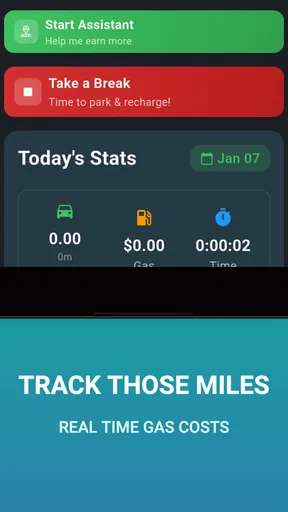
Our Review of Driver Power App
 Analysis by Appyee
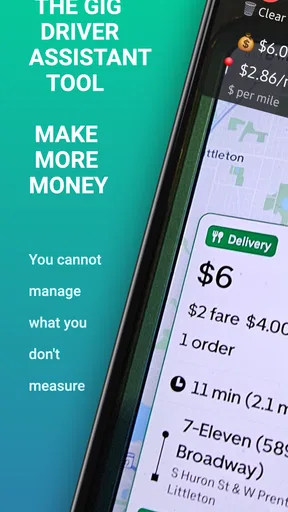
Driver Power App is the kind of business app I would open before accepting a rideshare or delivery job, not after the shift is already underway. Its purpose is practical: help drivers calculate whether a trip is worth the time, distance, and effort involved. I like that focus because many drivers do not need another social feed or complicated dashboard; they need a quick way to turn an offer into a clearer decision.
Developed by Byteblocks, LLC, this free app sits in the business category and is aimed at people who earn money through driving. It has an Everyone age rating, runs on Android devices using version 8.0 or later, and is currently at version 2.2.0. The app has passed the early discovery stage with over ten thousand installs, although its average rating of 2.9 from roughly thirty ratings suggests that the experience has not been equally smooth for everyone.
How Driver Power App feels when a decision needs to be quick
My first impression is that the app makes more sense as a decision aid than as a complete replacement for a rideshare or delivery platform. It does not need to be the place where a driver receives work. Its value is in helping answer a more useful question: after considering the route and the likely effort, does this job deserve my time?
That distinction matters. The usual alternative is mental arithmetic, a notes app, or a calculator kept open beside the driver platform. Those options can work, but they make the process inconsistent. One driver may focus on the displayed payout, another on distance, and another on how long the trip will keep them away from a busy area. A dedicated calculator encourages a more repeatable habit.
The strongest reason to try it is consistency. Even a simple calculation becomes more useful when I apply the same thinking to every offer instead of accepting the attractive-looking number at the top of the screen. For a part-time driver, that can make the app worthwhile even if it is used only a few times during a shift.
Speed expectations during a working shift
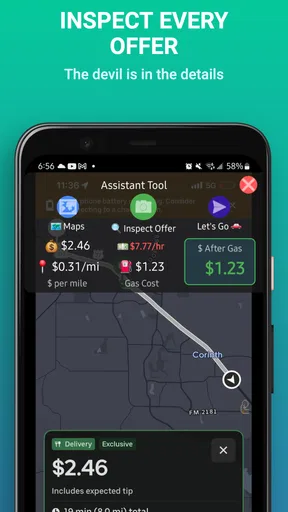
A calculator like this needs to feel immediate. If entering an offer takes too long, the driver may accept or reject the job before the result is ready. In practical use, I would treat Driver Power App as a quick companion: enter the relevant trip information, inspect the result, and return to the platform offering the work.
The app’s focused purpose should help it feel less demanding than a large driver-management suite. There is no reason to expect the same amount of navigation as a bookkeeping tool, route planner, or earnings tracker. That is useful when I am standing outside a restaurant waiting for an order or checking a new offer at a stop.
Still, speed is not just about opening time. It also depends on how many fields must be completed and whether I already know the figures the calculator expects. A driver who has to pause and search for information may lose the benefit of a fast interface. My practical advice is to decide in advance which personal threshold matters most, such as a minimum return for the time involved, and use the app to support that rule rather than inventing a new one for every offer.
It is also important not to confuse a quick result with a perfect financial answer. A calculator can make a decision faster, but it cannot remove uncertainty from traffic, waiting, parking, or the return trip. I would use the output as a screening tool, not as a promise about what a job will earn.
What happens when the app is used heavily
The most demanding situation is not a single calculation. It is repeated checking during a busy period, when several offers arrive close together and I am switching between the driving platform, navigation, and this app. That workflow exposes friction that may not appear during a casual test.
For heavy use, I would keep the process deliberately simple. I would pull over before entering details, record the offer amount and trip information, then make the decision before moving again. This is safer and also gives the calculation a better chance of being accurate. Trying to operate any secondary app while driving is a bad trade-off, even when the app itself is uncomplicated.
A useful habit is to compare similar offers rather than judging each one in isolation. For example, two deliveries may show similar payouts, but the one with less waiting and a better chance of ending near another busy area may be more sensible. Driver Power App can help organize the numerical part of that comparison, while I still have to supply local knowledge.
Another non-obvious use is reviewing a shift afterward. Instead of relying on memory, I can use the calculator on a few representative trips and see where my original assumptions were too optimistic. That makes it more valuable as a learning tool than as a one-tap acceptance button. Over time, the driver can refine personal rules for short trips, long pickups, and orders that take them far from demand.
Heavy use also reveals the app’s likely boundary. I would not expect it to replace a full spreadsheet or accounting application. A spreadsheet is better when I want a history of every trip, recurring expenses, tax categories, and monthly comparisons. Driver Power App is more appropriate when the decision is immediate and individual.
Reliability, recovery, and the cost of an interruption
Reliability matters more here than it might in a casual business app because the timing of a calculation can affect a real work decision. The modest average rating indicates that I would approach the app with reasonable expectations rather than assuming every device and workflow will behave identically. That does not make it unusable, but it does make a short personal trial sensible before depending on it during a full shift.
My preferred recovery routine is straightforward: keep the source offer visible, avoid entering figures from memory, and check the result before acting on it. If the app closes or behaves unexpectedly, I should be able to reopen it and repeat the calculation without treating the previous result as authoritative. This is one reason I would not use it as the only record of a day’s work.
A driver should also test the app in the same conditions in which it will be used. A quiet home Wi-Fi connection is not the same environment as a busy roadside, a low-battery phone, or a device running navigation and a driver platform at the same time. I cannot promise that every phone will respond identically, so I would test a few calculations before building the app into my routine.
The app’s free entry point lowers the risk of that trial. You can see whether its workflow fits your habits without committing to a purchase. At the same time, the presence of in-app purchases ranging from five cents to $47.99 per item means I would pay attention to any purchase screen and avoid assuming that every part of the experience is included at no cost.
That pricing detail is especially relevant for someone choosing between this and a basic phone calculator. If all you need is simple arithmetic, the built-in calculator has no learning curve and no purchase decisions. Driver Power App needs to save enough time or improve enough consistency to justify keeping it installed. Its dedicated purpose gives it a chance to do that, but the benefit depends on how often you evaluate driving offers.
Device constraints and practical phone habits
Android compatibility begins with version 8.0, which is helpful for people using older phones that still handle their everyday driver apps. It does not mean every older device will feel equally comfortable under pressure. Screen size, available memory, battery condition, and the number of apps open at once can all affect the overall experience.
I would be cautious about using a phone that is already struggling with navigation and the rideshare platform. The calculator may be lightweight in purpose, but the complete workflow is not lightweight: switching apps, reading an offer, checking a route, and returning to the work platform all compete for attention and system resources. Closing unnecessary apps and keeping the phone charged are sensible precautions regardless of which calculator is used.
Small screens deserve special attention. If entering values requires careful tapping, the app may be less convenient for drivers with older compact phones. In that case, preparing a repeatable method matters. I would enter information only while parked, use the same order every time, and avoid rushing through fields simply because an offer feels urgent.
There is also a difference between device compatibility and driving suitability. The minimum operating-system requirement tells me whether the app can run on a supported Android version; it does not tell me whether my phone mount, visibility, or multitasking setup is safe. The app should support a parked decision, not encourage interaction while the vehicle is moving.
For iPhone users, I would not assume the same availability or behavior without checking the relevant platform directly. The confirmed Android requirement gives a clear starting point for Android owners, while the practical recommendation remains the same: test the app on the actual phone used for work before relying on it.
Who gets the most value from the calculator
Driver Power App is best suited to people who regularly compare rideshare or delivery offers and want a dedicated place to make that comparison. New drivers may find it useful because it encourages them to think beyond the headline payout. Experienced drivers may appreciate it when a busy shift creates too many quick decisions to handle consistently in their head.
Consider a realistic evening scenario. I receive an offer that looks acceptable because the payout is visible immediately, but the pickup is several minutes away and the destination takes me away from the area where I usually find work. I would enter the relevant figures while parked, look at the calculation, and then add the non-numerical cost of the empty return. The app cannot know my local demand, but it can prevent me from ignoring the basic trip burden.
Another good use is comparing delivery work with rideshare work during the same week. The two types of jobs can feel different even when the displayed earnings look similar. A calculator gives me a common starting point, allowing me to judge the offers using the same personal standard instead of switching between vague impressions.
I would skip it if I drive only occasionally and already make these decisions comfortably with the built-in calculator. I would also look elsewhere if my main need is expense tracking, tax preparation, route optimization, or a permanent earnings history. Those tasks call for tools designed around records and reporting, not a focused trip calculation.
Drivers who want automatic information pulled from other platforms should also keep expectations realistic. A manual calculator can be useful precisely because it stays separate, but manual entry creates room for mistakes. If you prefer an integrated dashboard that imports trips and builds reports automatically, a more comprehensive driver-management service may be a better fit.
My performance verdict after weighing the trade-offs
Driver Power App has a clear, sensible role: it can turn a rushed acceptance decision into a more deliberate one. I like the idea of using it as a small checkpoint between seeing an offer and committing to it. The free starting price makes experimentation easy, and the Android requirement beginning at version 8.0 keeps it relevant to users who are not carrying the newest phone.
My reservation is that the app’s usefulness depends on disciplined use. It is not a substitute for knowing your operating costs, understanding local demand, or allowing for unpaid travel and waiting. It also should not become another distraction in a vehicle. The best workflow is parked, repeatable, and brief.
The rating of 2.9 from around thirty ratings makes me recommend a trial rather than an unconditional endorsement. I would install it, test several ordinary calculations, and see whether the result is clear enough to influence real decisions. I would also watch for purchase prompts because optional items can cost from a few cents to $47.99, which changes the value calculation for anyone expecting a completely free experience.
Overall, I see this as a potentially useful specialist tool for drivers who want a consistent way to screen jobs. It is more purposeful than a generic calculator, but less complete than a full earnings or accounting platform. If your main problem is deciding quickly whether a trip deserves your time, this app is worth testing; if your main problem is managing an entire driving business, choose a broader tool instead.
That is the distinction I would explain to a friend. Driver Power App can improve the moment of decision, especially when used with personal thresholds and local knowledge. It cannot make an unattractive trip profitable, guarantee uninterrupted performance, or replace careful records. Used within those limits, it has a practical place on an Android phone belonging to a rideshare or delivery driver.
Verdict
Strengths of Driver Power App
- Easy access to vehicle information and driving-related tools in one place.
- Useful for monitoring driving habits and encouraging safer behavior.
- Clean interface makes key features quick to find.
- Can help identify patterns that may improve fuel efficiency.
- Convenient digital alternative to keeping paper vehicle records.
Limitations of Driver Power App
- Some features may require compatible vehicle hardware or connected services.
- Accuracy can vary depending on phone sensors and vehicle data sources.
- Background tracking may increase battery and mobile data usage.
- Certain functions may be limited by region, vehicle model, or provider.
- Users may need to create an account and share driving-related information.
Other Releases by Byteblocks, LLC
View All
Orthodox Bible & Calendar
Books & Reference4.7
Similar Picks in This Category
View All
LinkedIn: Community & Network
LinkedIn3.8

Zoom Workplace
zoom.com4.1

Microsoft Teams
Microsoft Corporation4.6

Meta Business Suite
Meta Platforms, Inc.4.6

Webex Meetings
Cisco Systems, Inc.4.5

TeamViewer Remote Control
TeamViewer4.4
Frequently Asked Questions
What is Driver Power App and what can I use it for?
Driver Power App is designed to help drivers manage and improve their driving experience through a collection of practical tools and vehicle-related information. Depending on the available features in your region, it may provide driving insights, trip details, vehicle status information, reminders, or access to driver services. Before downloading, check the official listing to confirm which functions are supported on your device and in your country.
Is Driver Power App compatible with my Android or iPhone?
Compatibility depends on your phone’s operating system, version, available storage, and sometimes the vehicle or service connected to the application. The app should be downloaded only from the official Google Play Store or Apple App Store, where the current requirements are displayed. If Driver Power App uses Bluetooth, location services, or vehicle integration, your car and phone may also need to meet additional compatibility requirements.
Does Driver Power App require access to my location or vehicle data?
Driver Power App may request permissions such as location, Bluetooth, notifications, mobile data, or access to vehicle-related information in order to provide its main features. Location access can be necessary for trips, navigation-related functions, or driving analysis, while Bluetooth may be used to connect with a compatible vehicle. Review each permission carefully and consult the app’s privacy policy before accepting access.
Is Driver Power App free to download, and are there additional costs?
The download price and available features can vary between platforms, countries, and versions of Driver Power App. Some functions may be free, while others could require registration, a compatible service, a subscription, or payments connected to vehicle services. Check the official store page for in-app purchase information and read the terms carefully so you understand whether any recurring charges apply before activating premium features.
Is Driver Power App safe and reliable for everyday use?
Driver Power App should be installed from an official app store and kept updated to receive security improvements and bug fixes. As with any driving-related application, it should be used responsibly and never distract you while the vehicle is moving. Review its privacy settings, use a strong account password if registration is required, and verify important vehicle or trip information independently rather than relying exclusively on the app.
